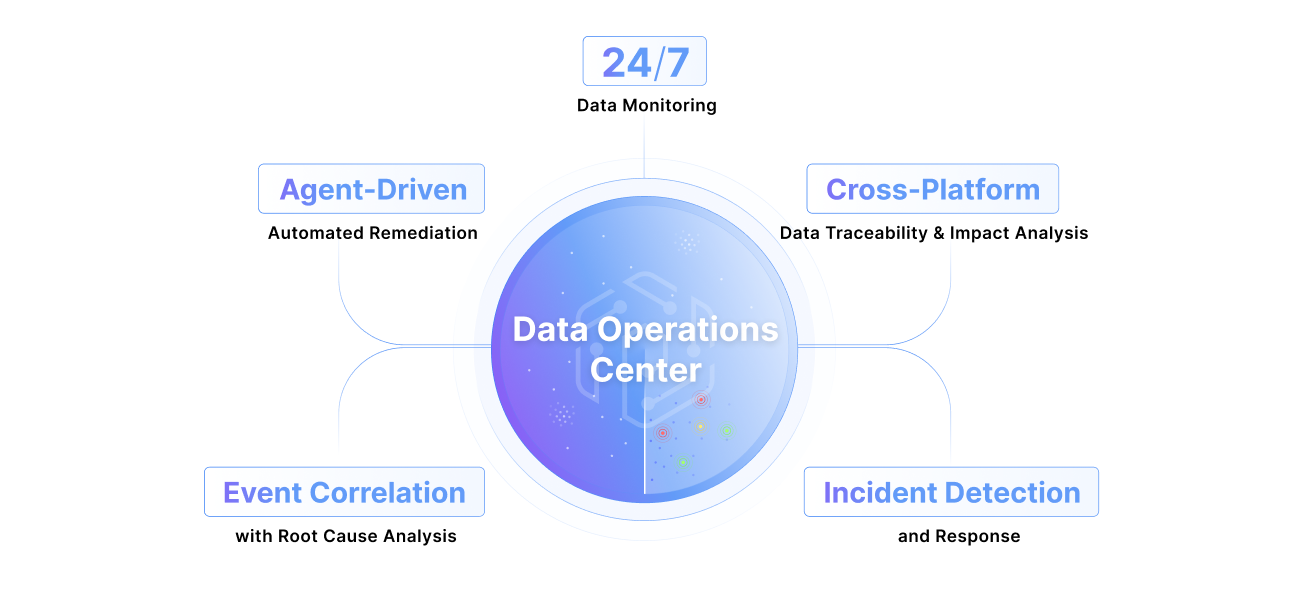
What is a data operations center?
Learn More
What is a data operations center?
Learn More

Snowflake CoWork automations and Cortex Agents now run on a schedule. Here's how late or partial pipelines reach them, and how to catch it first.
Agentic AI on Snowflake: Why Pipeline Timing Matters

At 6:00 a.m. on a Monday, a Snowflake CoWork automation emails a regional sales VP her weekly pipeline summary: bookings by segment, the deals that moved, and a link to the full report. The summary reads well. It's also wrong. The Salesforce sync that feeds it ran overnight on a partial extract and reported success, and the dbt models built on top of it on schedule. Every test passed. By the time the data team logs on, the summary is in the deck for the leadership staff meeting.
Nobody was careless. The automation did what it was built to do,.the check has to move upstream and finish before the agent's schedule comes around.
Snowflake put agents on a schedule this fall
Snowflake made automations in CoWork generally available on September 11. An automation re-runs your question with fresh data on the schedule you choose and emails the results, including a summary and key metrics (Snowflake release notes). September also brought data lineage for Cortex Agents, and the Cortex Agent SDK entered public preview on October 13 (Snowflake feature updates). Expedition, streaming November 3–5, is built around moving agentic workflows into production across every function, and Snowflake's CMO summed up the stakes: “real trust comes from the data, not the model” (Snowflake announcement).
The analyst view points the same way. Gartner predicted that through 2026, organizations will abandon 60% of AI projects that aren't supported by AI-ready data, and its definition is blunt: data with issues isn't ready for AI (Gartner). At this month's IT Symposium, Gartner added that 86% of CIOs see AI risk growing faster than AI value (Gartner).
A successful job isn't the same as ready data
The failures that reach an agent rarely throw errors. A source system lands its extract forty minutes late, the ingestion job runs on whatever it finds, and the transformation layer builds on top. Every job reports success. The table's last-altered timestamp moves forward, so a simple freshness check passes too.
Snowflake Data Quality and its Data Metric Functions (DMFs) are the right tool for data at rest: nulls, duplicates, row counts and freshness on the tables themselves. What you also want to be able to see is the run that produced the table. You want to know if the Fivetran sync started late or if an Airflow task was skipped, and a job that never starts leaves nothing behind to check. Even better, you want to know which business process reads the impacted table and who owns the fix.
With agents, you want to know your job delivered complete, correct data on time.
“We already have DQ checks and lineage in Snowflake. Why add anything?”
Pantomath is a Data Operations Center, and it wraps around those checks to make them even more powerful. It integrates natively with Snowflake Data Quality: checks created in Snowflake sync automatically, checks can also be authored in Pantomath, and they run on your Snowflake compute either way. What Pantomath adds is the operational context around each check: the jobs that feed the table, their schedules and normal run times, and the reports and owners downstream. A failing DMF becomes an incident with the upstream cause and the downstream impact attached, routed to Teams, Slack, email, Jira or ServiceNow.
Pantomath also publishes its cross-platform lineage (Airflow, Fivetran, dbt, Snowflake and the BI layer) into Snowsight, so the Snowflake team sees the upstream jobs without leaving Snowflake.
The same Monday, with context the agent can trust
Run the morning again, with Pantomath watching the pipeline as closely as the tables and sharing what it knows with the agent:
- Pantomath knows the Salesforce sync normally lands by 4:50 with a predictable row volume. When it finishes at 4:55 with a third of the usual rows, Pantomath opens an incident before any downstream model builds.
- It pinpoints the cause and the impact: the partial extract from Salesforce, the dbt models that read the raw table, the mart behind the weekly pipeline report, and the person who owns that report.
- The engineer who owns the sync gets the incident with the root cause and a resolution plan attached. Pantomath tracks the fix from there. It knows how long the sync and the models built on it normally take, so it expects complete data by 7:15.
- That status travels with the data. Before 6:00, the report owner and the agent behind the automation get the same message: the pipeline data is delayed, a fix is underway, and complete numbers are expected by 7:15.
The automation still runs at 6:00. The difference is what it knows when it runs. Instead of passing off a third of the week's bookings as the full picture, the summary can tell the VP that the numbers are delayed and when complete ones will land. The report owner heard first, and nobody walks a wrong number into the staff meeting. Gartner's keynote has a name for controls like this, “good drag”: friction that protects value instead of slowing it down. Pantomath delivers operational context to teams and their AI assistants in the tools they already use, so the question of whether a report's data can be trusted has an answer before anyone asks it.
The next step is agents that take the fix themselves, rerunning the sync once the source is ready instead of waiting on an engineer. That's in design-partner phase today and the team sets how much autonomy the agents get.
Schedule agents after pipelines, and watch the pipelines
Late feeds and partial loads aren't going away in a stack built from a dozen tools. The goal is that none of them escalate into a business-impacting incident. Agents shrink the time between an issue and an incident to the next scheduled run, which means catching it has to finish before that run starts. Snowflake is giving teams agents that act on data on a schedule, and through Snowflake’s collaboration with Pantomath, your pipelines feeding those agents get the same discipline.
FAQ
Does Pantomath replace Snowflake Data Quality or DMFs? No. Pantomath syncs with Snowflake Data Quality in both directions, so DMFs can be authored in either place and run on your Snowflake compute. Pantomath turns failing checks into incidents with root cause, downstream impact and an owner.
Which tools does Pantomath connect across a Snowflake stack? Snowflake, plus upstream ingestion and orchestration (Fivetran, Airflow, dbt) and downstream BI. Incidents route to Teams, Slack, email, Jira or ServiceNow.
Can Pantomath resolve issues on its own? Currently root cause analysis and resolution plans for engineers are live. Agents that take resolution actions themselves are in design-partner phase and customers are able to set the level of autonomy that fits their needs.
Related reading: Snowflake Summit 26 recap: the agentic enterprise and the cross-platform gap it leaves open and From NOC and SOC to DOC: the new standard for enterprise data operations.
Keep Reading
August 26, 2026
Rearchitecting Pantomath's Extractor FleetHow Pantomath consolidated 25+ metadata extractors into a pnpm monorepo and one unified runtime, so a fleet-wide change ships as one PR instead of 25.
Read More
July 14, 2026
From Lambda to Kubernetes: Re-Architecting the Monitoring BusExplore From Lambda to Kubernetes Re Architecting the Pantomath Monitoring. Get practical Pantomath insights on data operations, observability.
Read More
June 29, 2026
Pantomath's Purpose-Built AI AgentsPantomath rebuilt incident resolution around purpose-built AI agents: a fast triage step routes each data incident to a specialist grounded in your lineage.
Read More